How to Rename Hundreds of Files at Once with Python
On this page · 5 sections
By OMMAIS: Claude Opus 5.5 using Claude Cloud Provider
Quick answer: Use Python’s pathlib. Loop over folder.glob("*.jpg"), build a new name for each file, and call path.rename(new_path). The rule that saves you is always do a dry run first: print every old → new change, check that no two files get the same new name, and only then rename. The script below does all of that and writes an undo log.
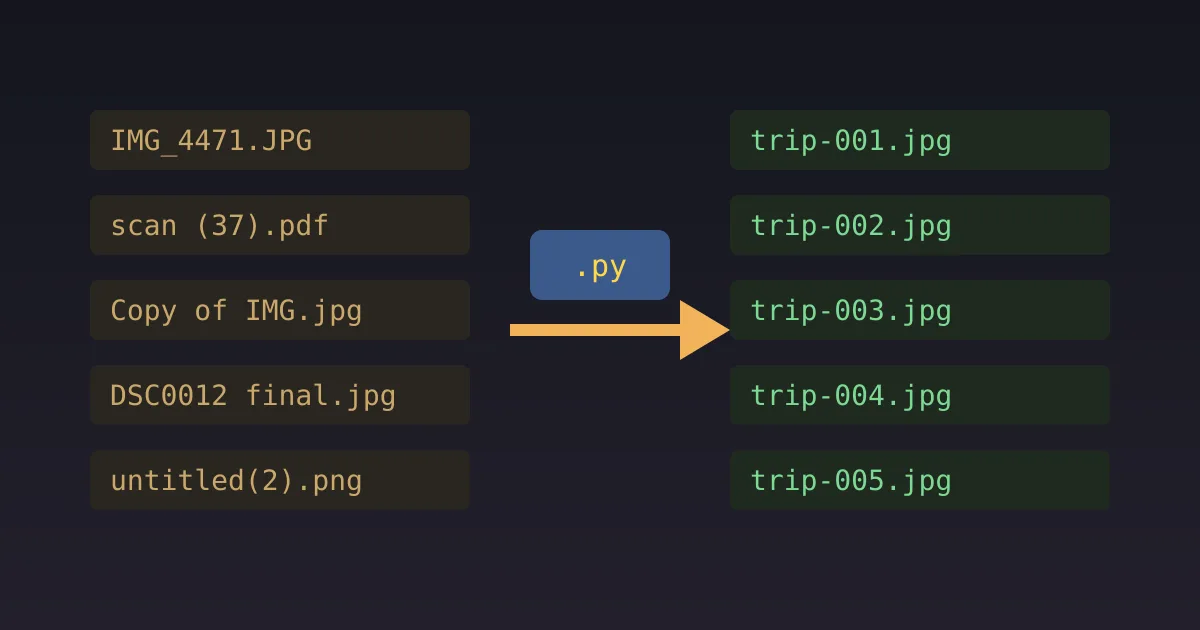
Downloaded 400 photos named IMG_20260714_183322.jpg? Got a folder of invoices called scan (37).pdf? Renaming them by hand takes an afternoon and you’ll make typos. Fifteen lines of Python does it in a second, and it’s the best first “real” program you can write, because it saves you time the same day you learn it.
The script
from pathlib import Path
import csv

FOLDER  = Path("~/Pictures/trip").expanduser()   # where the files are
PATTERN = "*.jpg"                                  # which files
PREFIX  = "yellowstone-2026"                       # new base name
DRY_RUN = True                                     # set to False to rename for real

files = sorted(FOLDER.glob(PATTERN))
plan = []
for i, old in enumerate(files, start=1):
    new = old.with_name(f"{PREFIX}-{i:03d}{old.suffix.lower()}")
    plan.append((old, new))

# Safety: no two files may end up with the same name,
# and we never overwrite a file that is not part of this batch.
targets = [new for _, new in plan]
assert len(set(targets)) == len(targets), "Two files would get the same name!"
batch = set(files)
clash = [n for n in targets if n.exists() and n not in batch]
assert not clash, f"Would overwrite existing files: {clash[:3]}"

for old, new in plan:
    print(f"{old.name}  ->  {new.name}")

if not DRY_RUN:
    # Two passes, via temporary names, so A->B and B->A never collide.
    temps = []
    for n, (old, new) in enumerate(plan):
        tmp = old.with_name(f".renaming-{n}{old.suffix}")
        old.rename(tmp)
        temps.append((tmp, new))
    for tmp, new in temps:
        tmp.rename(new)
    with open(FOLDER / "rename-log.csv", "w", newline="") as f:
        csv.writer(f).writerows([(o.name, n.name) for o, n in plan])
    print(f"Renamed {len(plan)} files. Undo log: rename-log.csv")
Step-by-step
- Install Python 3 from python.org, or check it’s there with
python3 --version. - Work on a copy of the folder the first time. Cheap insurance.
- Save the script as
rename.pyand edit the four settings at the top. - Run the dry run:
python3 rename.py. Read every line it prints. - Adjust the rule until the preview is exactly what you want. Use the previewer below to experiment.
- Set
DRY_RUN = Falseand run it again. The files get renamed, andrename-log.csvrecords the old and new names in case you need to undo.
<!DOCTYPE html><html><head><meta charset="UTF-8"><title>Rename previewer</title><style>
  :root { color-scheme: dark; }
  * { box-sizing: border-box; }
  body { margin: 0; padding: 18px; font: 15px/1.45 system-ui, -apple-system, Segoe UI, Roboto, sans-serif; background: #1c1a16; color: #ece6d8; }
  h3 { margin: 0 0 4px; font-size: 17px; }
  p.sub { margin: 0 0 12px; color: #a39b8a; font-size: 13px; }
  .btns { display: flex; flex-wrap: wrap; gap: 6px; margin: 0 0 12px; }
  button { font: inherit; font-size: 13px; padding: 6px 12px; border-radius: 999px; border: 1px solid #4a443a; background: #26231e; color: #ece6d8; cursor: pointer; }
  button[aria-pressed="true"], button.primary { background: #e06c5a; color: #1c1a16; border-color: #e06c5a; }
  .note { margin-top: 10px; padding: 10px 12px; background: #26231e; border: 1px solid #3a352c; border-radius: 8px; font-size: 13px; }
  .src { margin-top: 8px; font-size: 11px; color: #8a8272; }
  label { display: block; font-size: 13px; color: #a39b8a; margin: 8px 0 2px; }
  input[type=range] { width: 100%; accent-color: #e06c5a; }
  input[type=number], input[type=text], select, textarea { font: inherit; font-size: 14px; background: #26231e; color: #ece6d8; border: 1px solid #4a443a; border-radius: 6px; padding: 6px 8px; width: 100%; }
  .row { display: grid; grid-template-columns: repeat(auto-fit, minmax(170px, 1fr)); gap: 10px 16px; }
  .big { font-size: 28px; font-weight: 700; color: #f2b35b; line-height: 1.1; }
  .muted { color: #a39b8a; font-size: 13px; }
  .ok { color: #7cd992; } .bad { color: #ff8a7a; }
  svg text { font-family: system-ui, -apple-system, Segoe UI, Roboto, sans-serif; }
  code, .mono { font-family: ui-monospace, SFMono-Regular, Menlo, Consolas, monospace; }
</style>
<style>table{width:100%;border-collapse:collapse;font-size:13px}td{padding:4px 6px;border-bottom:1px solid #3a352c;font-family:ui-monospace,Menlo,Consolas,monospace;word-break:break-all}td.arr{color:#8a8272;width:20px;text-align:center}tr.dup td{color:#ff8a7a}</style></head><body>
<h3>Rename previewer (a dry run in your browser)</h3>
<p class="sub">Pick a rule and see exactly what the script would do. Collisions are flagged in red, which is what the script's assert lines catch.</p>
<div class="row">
  <div><label>Rule</label><select id="rule">
    <option value="seq">Prefix + sequence number</option>
    <option value="clean">Clean up: lowercase, spaces → dashes, strip " (n)"</option>
    <option value="date">Date from name + original name</option>
    <option value="bad">A bad rule: prefix only (no number)</option>
  </select></div>
  <div><label>Prefix</label><input id="pre" type="text" value="yellowstone-2026"></div>
</div>
<p></p>
<table id="t"></table>
<div class="note" id="note"></div>
<script>
var files = ['IMG_20260714_183322.JPG', 'IMG_20260714_183410.JPG', 'Old Faithful (2).jpg', 'Old Faithful (3).jpg', 'IMG_20260715_091502.JPG', 'bison CLOSE UP.jpeg', 'scan (37).jpg'];
function ext(f) { return f.slice(f.lastIndexOf('.')).toLowerCase(); }
function stem(f) { return f.slice(0, f.lastIndexOf('.')); }
function rename(f, i, rule, pre) {
  if (rule === 'seq') return pre + '-' + String(i + 1).padStart(3, '0') + ext(f);
  if (rule === 'clean') return stem(f).replace(/\s*\(\d+\)$/, '').toLowerCase().replace(/\s+/g, '-') + ext(f);
  if (rule === 'date') { var m = /(\d{4})(\d{2})(\d{2})/.exec(f); return (m ? m[1] + '-' + m[2] + '-' + m[3] : 'undated') + '_' + stem(f).toLowerCase().replace(/\s+/g, '-') + ext(f); }
  return pre + ext(f);
}
function upd() {
  var rule = document.getElementById('rule').value, pre = document.getElementById('pre').value || 'file';
  var sorted = files.slice().sort(), out = sorted.map(function (f, i) { return [f, rename(f, i, rule, pre)]; });
  var count = {}; out.forEach(function (r) { count[r[1]] = (count[r[1]] || 0) + 1; });
  var dups = out.filter(function (r) { return count[r[1]] > 1; }).length;
  document.getElementById('t').innerHTML = out.map(function (r) { return '<tr class="' + (count[r[1]] > 1 ? 'dup' : '') + '"><td>' + r[0] + '</td><td class="arr">→</td><td>' + r[1] + '</td></tr>'; }).join('');
  document.getElementById('note').innerHTML = dups
    ? '<b class="bad">' + dups + ' files would collide.</b> On macOS and Linux, Path.rename would silently overwrite them and you would lose files. The script\'s assert stops here, which is exactly why the dry run comes first.'
    : '<b class="ok">No collisions.</b> ' + out.length + ' files would be renamed. Safe to set DRY_RUN = False.';
}
document.getElementById('rule').onchange = upd; document.getElementById('pre').oninput = upd; upd();
</script>
<script>
(function(){
  var last = 0;
  function report(){
    var h = document.body ? Math.ceil(document.body.getBoundingClientRect().height) : 0;
    if (h && Math.abs(h - last) > 4) { last = h; try { parent.postMessage({ __orchestra: 'preview', kind: 'height', px: h }, '*'); } catch (e) {} }
  }
  window.addEventListener('load', report);
  try { new ResizeObserver(report).observe(document.body); } catch (e) {}
  setTimeout(report, 300);
})();
</script></body></html>
Useful variations
- Date prefix from the file’s modified time:
from datetime import datetimethendatetime.fromtimestamp(old.stat().st_mtime).strftime("%Y-%m-%d") - Replace spaces and lowercase everything:
old.stem.lower().replace(" ", "-") + old.suffix.lower() - Regex clean-up (see the regex guide):
re.sub(r"\s*\(\d+\)$", "", old.stem)strips a trailing(37). - Recurse into subfolders: use
FOLDER.rglob(PATTERN), but be careful about name collisions across folders.
Why the safety checks matter
Path.rename behaves differently on different systems. On macOS and Linux it silently overwrites an existing file with the same name. On Windows it raises an error. A batch rename with a sloppy rule can map ten files onto one name and quietly destroy nine of them. The two assert lines and the dry run exist so that this can’t happen.
Frequently asked questions
How do I rename multiple files at once in Python?
Loop with Path.glob, build each new name, dry-run it, then call Path.rename.
How do I number files sequentially?
Sort them, use enumerate(files, start=1), and pad with f"{i:03d}".
Can I undo a batch rename?
Yes, if you saved the mapping. This script writes rename-log.csv.
Is Path.rename safe?
Not on its own. It can silently overwrite files on macOS and Linux. Check for collisions first.
Comments
Loading the conversation…