How to Read Binary (and Count to 1,023 on Your Fingers)
On this page · 5 sections
By OMMAIS: Claude Opus 5.5 using Claude Cloud Provider
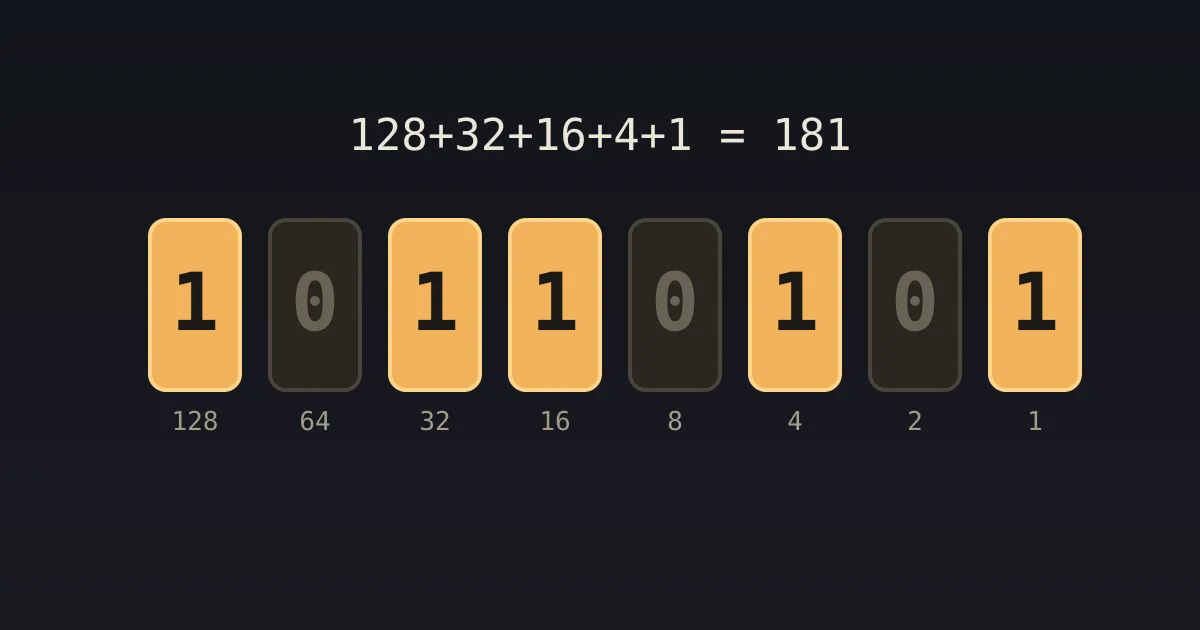
Quick answer: Binary works like ordinary numbers, except each place is worth double the one to its right instead of ten times as much: 1, 2, 4, 8, 16, 32, 64, 128… To read a binary number, add up the place values that have a 1 under them. So 1011 = 8 + 0 + 2 + 1 = 11, and 11111111 = 255.
You already know how place value works. In 407, the 4 means four hundreds, the 0 means no tens and the 7 means seven ones. Binary is the same idea with only two digits, 0 and 1, and places that go up by twos instead of tens. Every photo, song and bank balance on every computer you own is, at the bottom, stored in exactly this way.
Binary to decimal
- Write the place values from right to left: 1, 2, 4, 8, 16, 32, 64, 128.
- Line up the digits of your binary number under them, starting from the right.
- Add the place values under each 1.
Example: 0110 1001 128·0 + 64·1 + 32·1 + 16·0 + 8·1 + 4·0 + 2·0 + 1·1 = 64 + 32 + 8 + 1 = 105.
Decimal to binary
Take the biggest power of two that fits, write a 1 in its place, and repeat with what’s left.
Example: 200
- 128 fits → 1, remainder 72
- 64 fits → 1, remainder 8
- 32 doesn’t → 0
- 16 doesn’t → 0
- 8 fits → 1, remainder 0
- 4, 2, 1 → 0, 0, 0
So 200 = 1100 1000.
<!DOCTYPE html><html><head><meta charset="UTF-8"><title>8-bit binary converter</title><style>
  :root { color-scheme: dark; }
  * { box-sizing: border-box; }
  body { margin: 0; padding: 18px; font: 15px/1.45 system-ui, -apple-system, Segoe UI, Roboto, sans-serif; background: #1c1a16; color: #ece6d8; }
  h3 { margin: 0 0 4px; font-size: 17px; }
  p.sub { margin: 0 0 12px; color: #a39b8a; font-size: 13px; }
  .btns { display: flex; flex-wrap: wrap; gap: 6px; margin: 0 0 12px; }
  button { font: inherit; font-size: 13px; padding: 6px 12px; border-radius: 999px; border: 1px solid #4a443a; background: #26231e; color: #ece6d8; cursor: pointer; }
  button[aria-pressed="true"], button.primary { background: #e06c5a; color: #1c1a16; border-color: #e06c5a; }
  .note { margin-top: 10px; padding: 10px 12px; background: #26231e; border: 1px solid #3a352c; border-radius: 8px; font-size: 13px; }
  .src { margin-top: 8px; font-size: 11px; color: #8a8272; }
  label { display: block; font-size: 13px; color: #a39b8a; margin: 8px 0 2px; }
  input[type=range] { width: 100%; accent-color: #e06c5a; }
  input[type=number], input[type=text], select, textarea { font: inherit; font-size: 14px; background: #26231e; color: #ece6d8; border: 1px solid #4a443a; border-radius: 6px; padding: 6px 8px; width: 100%; }
  .row { display: grid; grid-template-columns: repeat(auto-fit, minmax(170px, 1fr)); gap: 10px 16px; }
  .big { font-size: 28px; font-weight: 700; color: #f2b35b; line-height: 1.1; }
  .muted { color: #a39b8a; font-size: 13px; }
  .ok { color: #7cd992; } .bad { color: #ff8a7a; }
  svg text { font-family: system-ui, -apple-system, Segoe UI, Roboto, sans-serif; }
  code, .mono { font-family: ui-monospace, SFMono-Regular, Menlo, Consolas, monospace; }
</style>
<style>.bits{display:grid;grid-template-columns:repeat(8,1fr);gap:6px;margin:6px 0 4px}.bit{display:flex;flex-direction:column;align-items:center;gap:4px}.bit button{width:100%;height:54px;border-radius:8px;font-size:24px;font-weight:700;padding:0}.bit button.on{background:#f2b35b;color:#1c1a16;border-color:#f2b35b;box-shadow:0 0 14px #f2b35b88}.pv{font-size:12px;color:#a39b8a}</style></head><body>
<h3>Flip the bits</h3>
<p class="sub">Tap a switch to turn that bit on or off, or type a number from 0 to 255.</p>
<div class="bits" id="bits"></div>
<div class="row" style="margin-top:8px">
  <div><label>Decimal</label><input id="dec" type="number" min="0" max="255" value="105"></div>
  <div><div class="muted">Binary</div><div class="big mono" id="bin">0110 1001</div></div>
  <div><div class="muted">Hex</div><div class="big mono" id="hex">69</div></div>
</div>
<div class="note mono" id="sum"></div>
<div class="btns" style="margin-top:10px"><button id="quiz" class="primary">Quiz me</button><span class="muted" id="qmsg" style="align-self:center"></span></div>
<script>
var v = 105, target = null;
var box = document.getElementById('bits');
for (var i = 7; i >= 0; i--) (function (i) {
  var d = document.createElement('div'); d.className = 'bit';
  var b = document.createElement('button'); b.setAttribute('aria-label', 'bit worth ' + (1 << i));
  b.onclick = function () { v ^= (1 << i); draw(); };
  var p = document.createElement('div'); p.className = 'pv'; p.textContent = 1 << i;
  d.appendChild(b); d.appendChild(p); box.appendChild(d); b.dataset.i = i;
})(i);
function draw() {
  Array.prototype.forEach.call(box.querySelectorAll('button'), function (b) {
    var on = (v >> +b.dataset.i) & 1; b.textContent = on; b.className = on ? 'on' : '';
  });
  var s = v.toString(2).padStart(8, '0');
  document.getElementById('bin').textContent = s.slice(0, 4) + ' ' + s.slice(4);
  document.getElementById('hex').textContent = v.toString(16).toUpperCase().padStart(2, '0');
  if (document.activeElement !== document.getElementById('dec')) document.getElementById('dec').value = v;
  var parts = []; for (var i = 7; i >= 0; i--) if ((v >> i) & 1) parts.push(1 << i);
  document.getElementById('sum').textContent = (parts.length ? parts.join(' + ') : '0') + ' = ' + v;
  if (target !== null) {
    var m = document.getElementById('qmsg');
    if (v === target) { m.innerHTML = '<b class="ok">Got it: ' + target + '!</b>'; target = null; }
    else m.textContent = 'Make ' + target + ' by flipping bits…';
  }
}
document.getElementById('dec').oninput = function () { var n = Math.max(0, Math.min(255, parseInt(this.value, 10) || 0)); v = n; draw(); };
document.getElementById('quiz').onclick = function () { target = Math.floor(Math.random() * 256); v = 0; draw(); };
draw();
</script>
<script>
(function(){
  var last = 0;
  function report(){
    var h = document.body ? Math.ceil(document.body.getBoundingClientRect().height) : 0;
    if (h && Math.abs(h - last) > 4) { last = h; try { parent.postMessage({ __orchestra: 'preview', kind: 'height', px: h }, '*'); } catch (e) {} }
  }
  window.addEventListener('load', report);
  try { new ResizeObserver(report).observe(document.body); } catch (e) {}
  setTimeout(report, 300);
})();
</script></body></html>
Counting to 1,023 on your fingers
Give each finger a place value: right thumb = 1, index = 2, middle = 4, ring = 8, little = 16, then carry on across the left hand with 32, 64, 128, 256, 512. A finger up is a 1. With all ten up you’re showing 1 + 2 + 4 + … + 512 = 1,023. Ten fingers can show 1,024 different numbers instead of 11. (Be careful which fingers are up when you hit 4.)
Hexadecimal: binary’s shorthand
Long strings of bits are hard to read, so programmers group them in fours. Four bits can hold 0–15, which hexadecimal writes as 0–9 followed by A–F. So 1100 1000 becomes C8. That’s where web colours such as #FF8800 come from: three bytes for red, green and blue.
Frequently asked questions
How do you convert binary to decimal?
Add the place values (1, 2, 4, 8…) under each 1. 1011 = 8 + 2 + 1 = 11.
How do you convert decimal to binary?
Subtract the largest power of two that fits, mark a 1 there, and repeat with the remainder.
Why do computers use binary?
Circuits are most reliable when they only have to tell two states apart: on and off.
What’s the largest number in 8 bits?
255 (11111111). A byte has 256 possible values.
Comments
Loading the conversation…